STEM & Learning

10 Best Coding Robot for Kids 2026: Reliable Picks That Teach Coding

Which coding robots for kids actually teach programming without constant frustration? This guide helps parents find reliable options for ages 4-14, from screen-free to advanced Arduino kits.

Coding robots for kids come with big promises. But after unpacking, many parents face a familiar disappointment: the robot doesn't move straight, the app won't pair, or it fails entirely within a week. The market is full of gadgets that look great in photos but frustrate in practice.

This guide focuses on the robots that actually teach coding without constant troubleshooting. Whether you prefer screen-free play or app-driven challenges, we've identified the models that balance fun, education, and durability. The goal is a robot that works reliably out of the box and keeps working.

From entry-level block coding to Arduino and Python, these picks cover a wide range of ages and skill levels. You'll find options that grow with your child, not ones that end up in a drawer.

#1

Sphero Bolt

Sphero Bolt

Ages 10+ Coders

Doodle Score 9.4/10
Check Price

Worth Noting

  • In longer sessions, battery life can fall short of the advertised 4 hours.
  • Android app compatibility varies
Accessories
Inductive charger
Age & Screen-Free
8+ App-based
Assembly Required
No
Programming Languages
Blocks, JavaScript, Python
Read the full review

The Sphero Bolt skips the toy-like block interfaces and goes straight to genuine programming languages. Kids and hobbyists control the ball’s speed, direction, and 8x8 LED matrix using JavaScript or Python in the Sphero Edu app. The waterproof, scratch-proof shell and inductive charging mean it survives drops and outdoor use without fuss. For learners ready to move beyond drag-and-drop, this is a focused tool that rewards persistence.

This robot suits kids 8 and up who already understand basic coding logic or have an adult guide nearby. The premium price and occasional battery drain (some users see less than the advertised 4 hours) make it a commitment — better for STEM clubs or serious hobbyists than casual play. Android app compatibility can be spotty on certain models like the Pixel 6, so an iPad or iPhone offers a smoother experience out of the box.

Tip: Charging via the inductive base overnight ensures a full day of classroom coding without interruptions.

Bottom line: Best for kids and adults who want to write real code on a rugged robot — expect to pair it with an iOS device for the most reliable experience.

#2

LEGO Boost

LEGO Boost

LEGO Fans 7+

Doodle Score 9.4/10
Check Price

Worth Noting

  • App-based instructions with no printed manual can be frustrating for some builders
Accessories
847 pieces, 5 models
Age & Screen-Free
7+ App-based
Assembly Required
Yes (build models)
Programming Languages
App blocks
Read the full review

The LEGO Boost delivers the building fun of 847 pieces across five models while introducing coding logic through the app. However, the premium price and reliance on a tablet app with no printed manual mean it suits families already invested in LEGO and comfortable with digital instructions.

Bottom line: Ideal for LEGO fans who want to combine building with coding and already own a compatible tablet, but the price and app dependency make it a niche pick.

#3

ELEGOO UNO R3 Car Kit

ELEGOO UNO R3 Car Kit

Ages 8+ Arduino

Doodle Score 9.2/10
Check Price

Worth Noting

  • Printed instructions assume some basic electronics knowledge; complete beginners may need external tutorials.
  • Pre-loaded code and app can be unreliable; expect to troubleshoot connectivity and behavior occasionally.
Accessories
24 modules, remote, battery
Age & Screen-Free
8+ App-based
Assembly Required
Yes (required)
Programming Languages
Arduino (C++)
Read the full review

This kit packs 24 sensor types — obstacle avoidance, line tracking, IR remote, Bluetooth — into one build-it-yourself car. The XH2.54 ports simplify wiring, so assembly focuses on understanding how each module works rather than wrestling with jumper cables. Build quality is solid, with components fitting together cleanly even for first-time builders.

Best suited for children ages 8 and up who have some adult help available for initial setup. The pre-loaded demo code and app can be finicky — occasional disconnects or unexpected behavior means troubleshooting is part of the experience. For families wanting an immediate out-of-box toy, this isn't that; for a STEM project or homeschool group willing to work through a few hiccups, it's a rich learning tool.

Tip: Keep a smartphone or tablet nearby for Bluetooth pairing — a stable device connection reduces app disconnects during programming.

Bottom line: For a parent or educator ready to guide a child through building and coding a full-featured robot, this kit offers unmatched educational depth at a low price — just plan for some troubleshooting along the way.

#4

Sphero Mini

Sphero Mini

Ages 8+ Fun

Doodle Score 9.2/10
Check Price

Worth Noting

  • Bluetooth range is limited
  • Soft carpet stops the ball; it works best on tile, wood, or laminate floors.
Accessories
Cones, pins
Age & Screen-Free
8+ App-based
Assembly Required
No
Programming Languages
Draw, blocks, JavaScript
Read the full review

Right out of the box, the Sphero Mini rolls, spins, and lights up – it is the least intimidating coding robot for kids and a surprising hit with cats. Its small ping-pong-ball size means it can vanish under furniture, and Bluetooth connections may drop when the ball is more than a few feet away. The robot also stalls on carpet, so hard floors are required. This is a toy for instant gratification and basic coding exploration, not a platform for serious programming – the Sphero Bolt handles that.

Best suited for kids 8 and up who want a quick, app-driven robot, and for parents looking for a low-commitment introduction to coding. Pet owners will enjoy watching cats chase it, but the small size and carpet limitations mean it works best in clear, open spaces on hard flooring.

Tip: Stick to hard, clear surfaces for best performance – carpet can cause the ball to stall and reduce the fun.

Bottom line: If your child wants instant play and you have hard floors, the Sphero Mini delivers a fun, budget-friendly introduction to coding without the assembly hassle.

#5

Makeblock mBot

Makeblock mBot

Ages 8+ Structured

Doodle Score 9.2/10
Check Price

Worth Noting

  • Bluetooth connection can drop during play, especially at range.
  • The mBlock app may become unresponsive or fail to pair on some tablets and phones.
Accessories
Line-follow, obstacle modules
Age & Screen-Free
8+ App-based
Assembly Required
Yes (15 min)
Programming Languages
Scratch, Arduino
Read the full review

The mBot stands out by getting a metal robot assembled in about 15 minutes, then moving from drag-and-drop Scratch to text-based Arduino programming. This progression gives kids a clear next step without overwhelming them. The build quality holds up to classroom or living room use, and the line-following and obstacle-avoidance modes offer immediate payoff.

Best suited for kids 8+ who have some adult help available, especially if a parent can troubleshoot occasional Bluetooth hiccups or app unresponsiveness. The Bluetooth module may drop connection during wireless play — using the USB cable for programming bypasses that entirely. The mBlock app is functional but can lag or fail to connect on some devices, so a backup USB connection is worth having ready.

Tip: Keep a USB cable handy — programming via wire is more stable when Bluetooth acts up.

Bottom line: If you want a budget-friendly robot that eases into real Arduino coding and you don't mind the occasional Bluetooth hiccup, this is the one.

#6

Dash Robot

Dash Robot

Ages 6+ Interactive

Doodle Score 9.2/10
Check Price

Worth Noting

  • App connection may be inconsistent on certain Android and Fire tablets.
  • Wheels may wear down over time under heavy classroom use.
Accessories
-
Age & Screen-Free
6+ App-based
Assembly Required
No
Programming Languages
Blockly, Wonder, Path
Read the full review

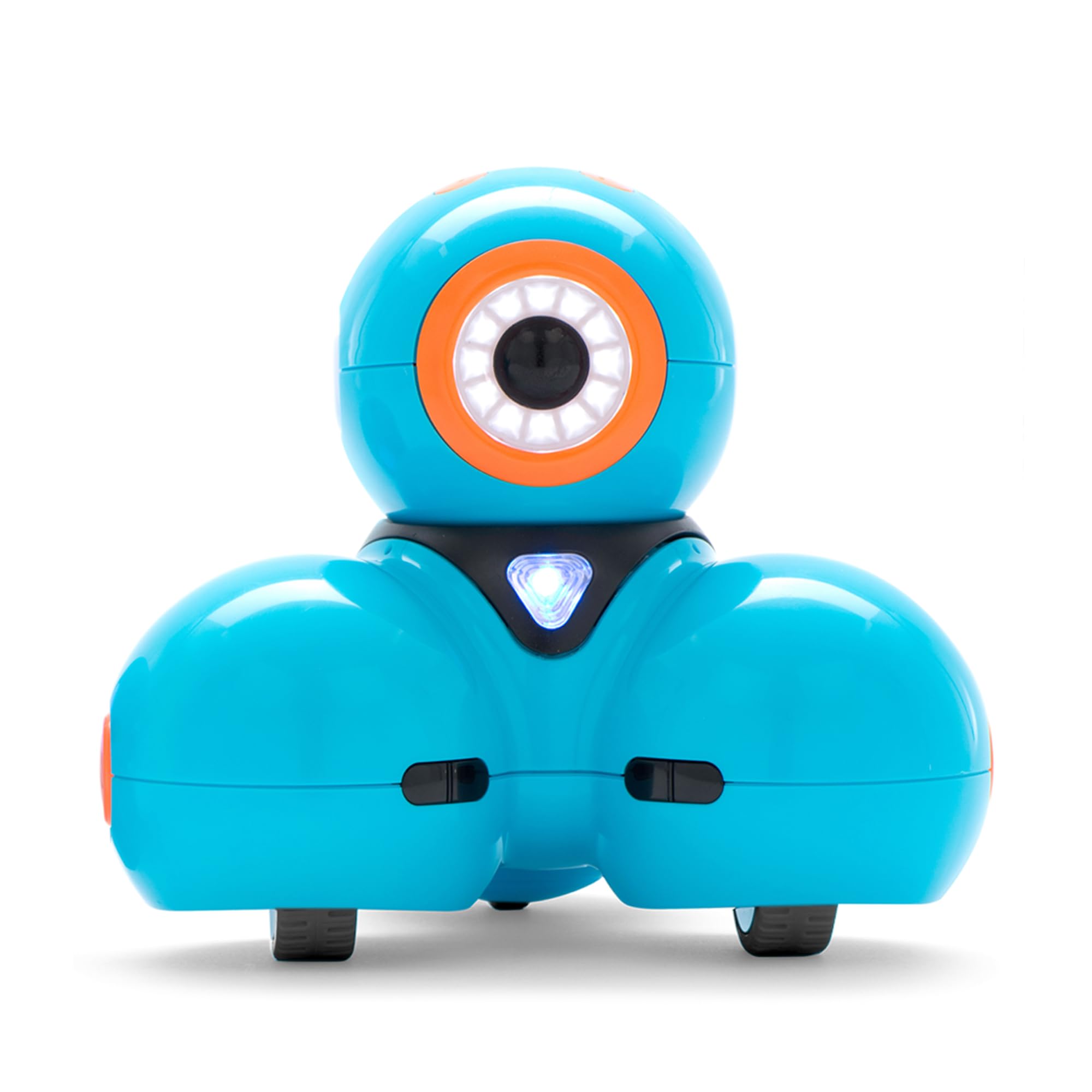
Dash responds to voice commands, sings, dances, and navigates obstacles — making it the most interactive robot in this comparison. Multiple apps (Blockly, Wonder, Path) offer progressive challenges that keep kids engaged during lessons or free play.

This robot shines in classrooms and families already invested in Wonder Workshop accessories, where the interactive experience outweighs the need for deeper programming. For those considering the advanced coding-focused option (like the Bolt), Dash leans more on play than Python. Note that wheel wear may occur over extended use, and some Android or Fire tablets may have app connection hiccups — test compatibility before committing.

Tip: Check wheel alignment periodically to prolong lifespan; test app on your device before purchase.

Bottom line: Best suited for classrooms and families already in the Wonder Workshop ecosystem who value interactive play over advanced programming.

#7

Botley Coding Robot

Botley Coding Robot

Screen-Free 5+

Doodle Score 9.2/10
Check Price

Worth Noting

  • Lacks the obstacle detection and multi-vehicle transformations offered by the newer Botley 2.0.
Accessories
40 cards, tiles
Age & Screen-Free
5+ Screen-free
Assembly Required
No
Programming Languages
Screen-free 80-step
Read the full review

Botley the Coding Robot delivers 80-step screen-free programming with a simple included remote, making it a solid entry point for teaching sequencing and loops. But it lacks the obstacle detection, vehicle transformation, and larger command capacity of the newer Botley 2.0, so buyers after the fullest feature set should consider the updated version. Long-term performance in real-world conditions has not been extensively reported, which adds some uncertainty for heavy classroom use.

Bottom line: Best for families who want a simple, screen-free coding introduction and are not concerned about having the latest features.

#8

Botley 2.0

Botley 2.0

Ages 5+ Screen-Free

Doodle Score 9.0/10
Check Price

Worth Noting

  • Movement may be inaccurate
  • Robot may stop responding after a few uses, requiring a return or replacement.
Accessories
78 pieces, obstacles
Age & Screen-Free
5+ Screen-free
Assembly Required
No
Programming Languages
Screen-free 120-step
Read the full review

The Botley 2.0 Activity Set packs 78 pieces, 120-step commands, and vehicle transformations into a screen-free coding experience. However, some units may stop responding after a few sessions, and movement can be imprecise — the robot may not drive straight or turn as programmed. This set works best for parents committed to screen-free learning who are prepared to handle potential defects, ideally with a generous return policy.

Tip: Test the robot immediately after unboxing and return it if movement or responsiveness seems off within the first few uses.

Bottom line: A fun screen-free coding concept that can teach basics, but occasional unit issues make a generous return policy a smart move.

#9

Ozobot Evo

Ozobot Evo

Color Coding 5+

Doodle Score 8.8/10
Check Price

Worth Noting

  • Charging issues may occur in some units
Accessories
Markers, case, cable
Age & Screen-Free
5+ Both
Assembly Required
No
Programming Languages
Color, Blockly
Read the full review

The Ozobot Evo introduces coding through screen-free color markers and online Blockly with over 700 STEAM lessons. However, its premium price for a small robot and occasional charging issues in some units make it suited for buyers ready for potential unit variance.

Bottom line: Best for families committed to screen-free learning who are prepared for possible unit inconsistencies.

#10

Mech 5

Mech 5

Teens Mechanical

Doodle Score 8.8/10
Check Price

Worth Noting

  • Plastic components can crack during assembly, requiring extra care.
Accessories
Coding wheel, parts
Age & Screen-Free
10+ Mechanical
Assembly Required
Yes (hours)
Programming Languages
Mechanical wheel
Read the full review

The Mech 5 introduces mechanical coding via a simple wheel-and-snap-button system, offering a low-cost way to see how physical logic works. But the assembly demands multiple hours of careful work, and the plastic components can crack during construction. Even after a successful build, the robot may not move as intended, making this more a challenging project than a dependable coding toy.

Bottom line: If you want a low-cost build project that introduces mechanical coding and have the patience for delicate assembly, this fits. For a reliable screen-free coding toy for kids, look to options with simpler assembly and more consistent movement.

How to Choose

Age and Screen-Free vs. App-Based

Younger children (ages 4-7) benefit from screen-free robots that use physical buttons or color codes. These avoid tablet dependency but often have limited programming depth and can suffer from movement inaccuracies.

App-based robots offer richer coding but require device compatibility and can be distracting. Choose based on whether you want screen-time limits or more advanced capabilities.

Assembly Required or Ready Out of Box

Some robots come fully assembled, ready to play immediately. Others require building, which can take 15 minutes to several hours. Assembly kits teach engineering but demand adult patience. A rushed build often leads to loose connections and malfunction.

Programming Languages Supported

Block-based coding (Scratch, Blockly) is ideal for beginners. As kids progress, robots that support Arduino, Python, or JavaScript offer a natural upgrade path. However, text-based languages require a keyboard and screen, reducing the toy feel.

Durability and Reliability

Coding robots take falls and rough handling. Metal chassis and wired connections tend to outlast plastic models with fragile moving parts. Battery life and motor quality also affect long-term reliability. Look for rechargeable batteries and robust wheels.

Included Accessories

Maze tiles, coding cards, and additional sensors expand play value. Kits with multiple accessories keep children engaged longer, but more pieces also mean more to lose. Consider storage and whether the accessories are essential or just clutter.

Frequently Asked Questions