STEM & Learning

8 Best AI Toys for Kids 2026: Robots, Pets and AI Art

We tested smart robots, robot pets and AI drawing projectors to find the ones children can run themselves, and the ones worth the money.

An AI toy is a small brain in a plush body or a plastic shell — a microphone, a speaker, and a model trained to answer back. That's why the category is so uneven: two boxes look identical on the shelf and one holds a real conversation while the other repeats three jokes until everyone in the car wants it out the window. A good one buys you play that goes somewhere — a robot that turns when a hand waves, a drawing that actually looks like the dog.

My kids' interest in talking toys rises and collapses inside a week, so I judge these on day ten instead of on the demo. We spent four months with 12 AI toys — living rooms, back seats, kitchen tables — and the ones still getting picked up answered quickly and reliably and did something a stuffed animal can't. A toy that only talks at you gets old; the good ones keep the play moving. The picks below cleared that bar.

#1

Ruko 6088

Ruko 6088

First smart robot

Doodle Score 9.2/10
Check Price

Worth Noting

  • Programming and quizzes live behind the phone app
  • No voice control
Control Methods
Remote, app, gravity, gesture
Recommended Age
3-6 years
Programmable Steps
200 icons
Play Time Per Charge
120 minutes
Read the full review

Wave a hand in front of the 6088 and it responds — no controller, nothing to lose down the back of the sofa. That gesture sensing is the first thing a child works out, and it is why this is the robot we hand over when a four-year-old wants to play alone. It stands about 10.8 inches tall, small enough to carry between rooms and substantial enough to feel like a robot rather than a trinket.

We rate it the easiest of these to hand to a young child, and the programming is why it does not wear out. The app's program bar takes 200 icons — moves, expressions, letters, music — and runs them back as a sequence the robot performs. Building the first one takes an adult sitting alongside; after that, kids run the whole thing from the small remote or from the phone.

There is more under the lid than dancing. The app carries short interactive quizzes on space and nature, and the one-key memo records a voice message that the robot repeats back — the feature that gets used long after the songs have been played to death. A charge buys about two hours of play, which covers a rainy afternoon comfortably.

One thing to know: this is a tabletop robot that shuffles, slides and dances rather than one that roams a room; for roaming, look at the bigger 1088. What it does instead is perform at table height, right where a four-year-old's face is, which is where most of the play actually happens.

Bottom line: For a first smart robot a four- or five-year-old can drive alone, we recommend the 6088: gesture control, 200 programmable steps and an app that keeps teaching.
#2

Caydo T3

Caydo T3

AI art station

Doodle Score 9.2/10
Check Price

Worth Noting

  • Corded only
  • Wi-Fi pairing can be the fiddly step
Power
Corded electric
Projection
Native 720p
AI Features
Idea-to-drawing, photo tracing
Recommended Age
5-12 years
Read the full review

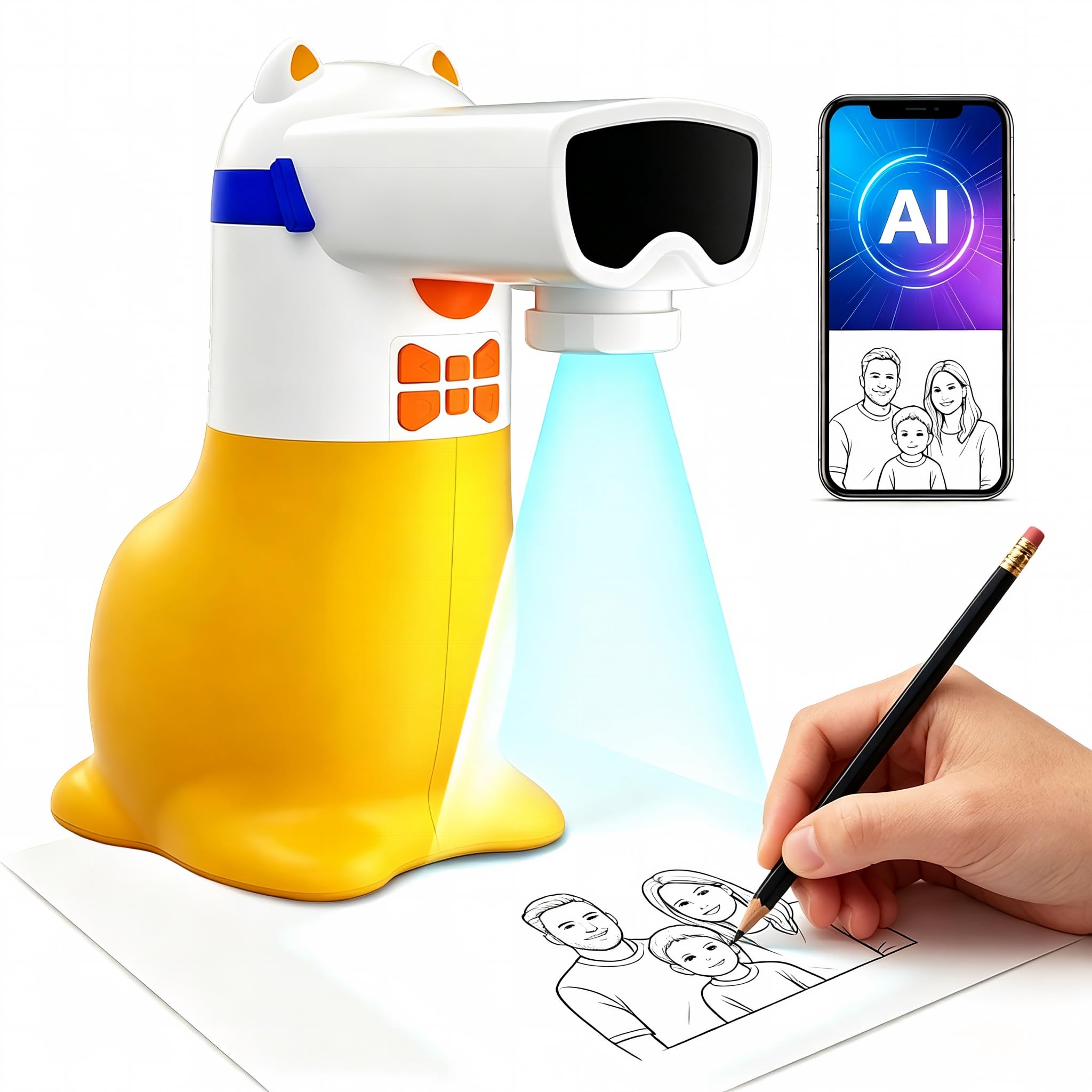
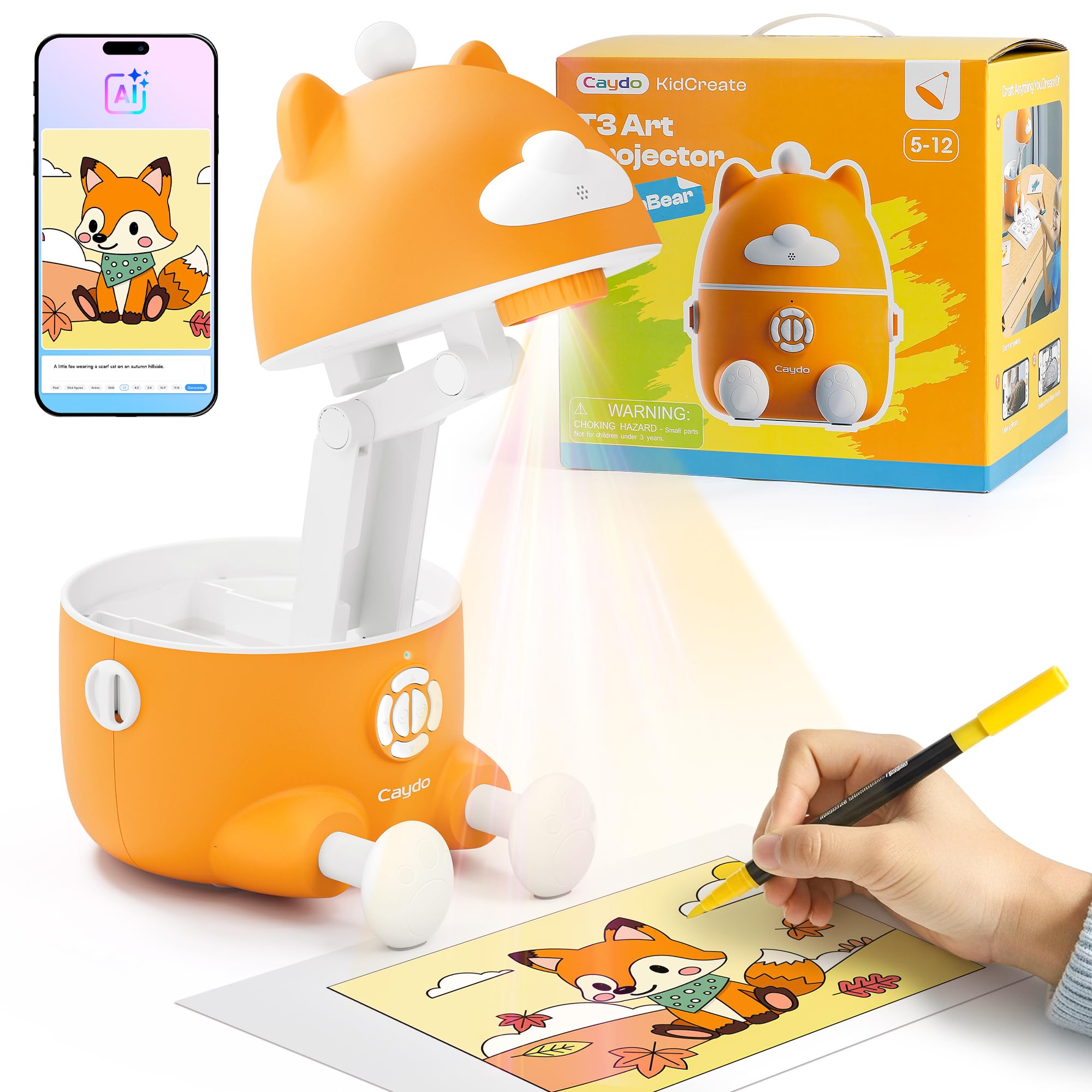
Type a wish — a dragon eating pizza, a castle in space — and the T3 turns it into an outline you can project onto paper and trace. It is the most capable AI drawing station in this group: a native 720p projector, five learning modes and a remote, not just an app and a lens. At the top of the price range we still think it earns the spot, because a child who draws daily uses it differently from a robot that gets switched on twice.

Set-up is a table in a dim room. The projector sits above the paper and shines down, so the child looks at the reflected outline instead of into a lens, and the light carries SGS eye-safety certification. The base is wide and heavy for a toy its size, which keeps the projection steady when a child leans on the table — and a projector that shifts mid-drawing ruins the picture.

The AI and photo modes lean on the app and your Wi-Fi, and that pairing is the one step that can go wrong. Drawing itself works without either: there is built-in content and a remote, so a child can keep going while your phone is in your pocket. Photo mode is the sleeper — a snapshot of the family dog becomes a traceable outline and then a handmade present for a grandparent.

Bottom line: If your child already draws every day, the Caydo T3 is the AI toy worth stretching for: a real 720p projector that turns typed ideas into traceable outlines.

#3

RIVGOT Drawing Robot

RIVGOT Drawing Robot

Screen-free drawing

Doodle Score 9.2/10
Check Price

Worth Noting

  • Simple line art that older kids outgrow
Guidance
Voice-guided steps
Drawing Cards
150
Recommended Age
3-8 years
Markers Included
12 colors
Read the full review

A hundred and fifty cards, twelve markers, five pens and a reusable board: the RIVGOT is a self-contained art station that needs no phone, no Wi-Fi and no account. Pick a card and the robot draws the picture step by step while a voice talks a child through it, with music underneath.

For three- to six-year-olds that is a good fit — the cards do the teaching, each drawing is simple enough to finish, and the reusable board means a session does not end with paper spread across the kitchen table. It is also the only pick here that works away from a wall socket and a screen, which makes it the one to pack for a restaurant or a long car trip.

Two limits worth knowing. The designs are simple line pictures, so a seven- or eight-year-old will have worked through the interesting ones in a couple of sittings — the card library is the product, and when it runs out the toy is largely done. And the drawing arm is the part that can fail, with units that stop mid-card and will not reset. Run a few cards in the first week while the return window is open.

We keep it in the roundup as the screen-free option: nothing else here is as easy to hand to a four-year-old, and nothing else asks so little of whoever is in charge. It is a younger child's toy and it is honest about that, which is more than most of the AI shelf manages.

Bottom line: The pick for a three- to six-year-old who wants to draw right now, with no phone involved: 150 guided cards and a robot that walks them through each one.

#4

Ruko 1088

Ruko 1088

Older kids

Doodle Score 9.0/10
Check Price

Worth Noting

  • Shorter run time than the cheaper 6088
Height
15.8 inches
Control Methods
Remote, app, voice
Recommended Age
4-9 years
Play Time Per Charge
100 minutes
Read the full review

At 15.8 inches it is tall enough that a five-year-old looks up at it, and that height is the pitch: nine flexible joints, ten expressions, ten songs, and routines running from gymnastics to storytelling. At 2.8 pounds it is light enough to carry between rooms, and the roughly 11-by-5-inch footprint fits on a shelf when it is not in use.

Three ways in: remote, app and voice. Voice is what separates it from the cheaper 6088 and the one children gravitate to once they have learned the trigger phrases. The remote is the weakest of the three — the robot does not always turn to face it, so a command can land as a shrug; re-aim and it picks up, and the app sidesteps the problem entirely.

The features are real, and the premium is real with them. We see the 1088 as the pick for the older end of its range — seven, eight, nine — where storytelling, recording and a ten-song playlist get more than one outing. Buy it for a four-year-old and you are paying for height and joints that mostly impress the adults in the room.

Two practical notes before you commit. It wants a hard floor; on carpet the walking routines stall and the whole thing looks like hard work. And charging has a quirk worth knowing on day one: it needs the cable that comes in the box, because a USB-C to USB-C lead will not charge it.

Bottom line: Buy the 1088 for the seven- to nine-year-old who wants a robot with presence and a voice — just budget for hard flooring and a shorter run.

#5

KingsDragon Robot

KingsDragon Robot

Budget first robot

Doodle Score 9.0/10
Check Price

Worth Noting

  • Remote and charger are the weak links
  • Basic movement next to the Ruko robots
Control Methods
Gesture, remote
Recommended Age
6-10 years
Programmable Moves
50
Play Time Per Charge
1.5-3 hours
Read the full review

The lowest price in this group still buys gesture control, a remote and 50 moves you can record and replay, plus a robot that sings, dances and talks with a volume control on the handset. Nothing about it feels stripped down; it feels like a robot that picked its tricks carefully and skipped the screen.

Recording a sequence is the best thing it does: press record, drive it through a few moves and turns, stop, and it repeats the lot back. At 10.2 inches and 1.2 pounds it is easy for a child to move around, and the battery runs 1.5 to 3 hours after a two-hour charge, with up to a month of standby between sessions.

Our read: this is the one to buy when you are not certain the robot bug will last past the first month, because it delivers the two things children actually use — gesture tricks and a programmable sequence — without a phone in the room. The two parts that can let you down are the remote and the charging, so pair the remote and run a full charge on day one while the packaging is still around.

Bottom line: The cheapest robot here still gives a six-year-old gesture control and 50 recordable moves, and that makes it the low-risk way to test the robot habit.

#6

Yoture AI Drawing Projector

Yoture AI Drawing Projector

Midprice AI drawing

Doodle Score 8.8/10
Check Price

Worth Noting

  • Corded, no battery
  • AI and photo modes run through the phone app
Power
Corded, no battery
AI Features
Idea-to-drawing, photo tracing
Recommended Age
5-12 years
Built-in Pictures
50
Read the full review

The Yoture does the trick that sells AI drawing toys — type an idea, get a picture to trace — and it arrives with 50 pictures built in, so a child can start before anyone has opened the app. There are add-on drawing and learning packs too, and the speaker reads numbers and words aloud as the matching picture appears.

That combination makes it the midprice route into AI art, well under the Caydo, and for a child who wants to trace a photo of the family dog rather than work through five drawing modes, it covers the same ground. We like it as a first AI art toy for exactly that reason: the ambition is there without the projector price, and the spoken packs give it a second life once the novelty of tracing fades.

Sharpness is the thing to watch. The image is only as crisp as the angle you set it at, and the further the projector sits from the paper the softer the outline gets, so a child who rushes the set-up gets a blurry line to follow. Give it a properly squared-up position on a table and the tracing lines come out clean.

Bottom line: The midprice way into AI drawing: type an idea and trace it, with 50 pictures built in and spoken learning packs, as long as a table near an outlet suits you.

#7

TUEESN Robot Dog

TUEESN Robot Dog

No-app pet play

Doodle Score 8.4/10
Check Price

Worth Noting

  • Loud, with no volume control
  • Remote only
Actions
30+
Control
Remote and voice
Remote Range
25 m
Recommended Age
6 years and up
Read the full review

No app, no Wi-Fi, no account: the TUEESN is the robot pet we reach for when nobody in the house wants to be tech support at seven in the evening. It answers a remote with voice commands, and the 25 m range means it works from the far end of a garden as easily as from the sofa.

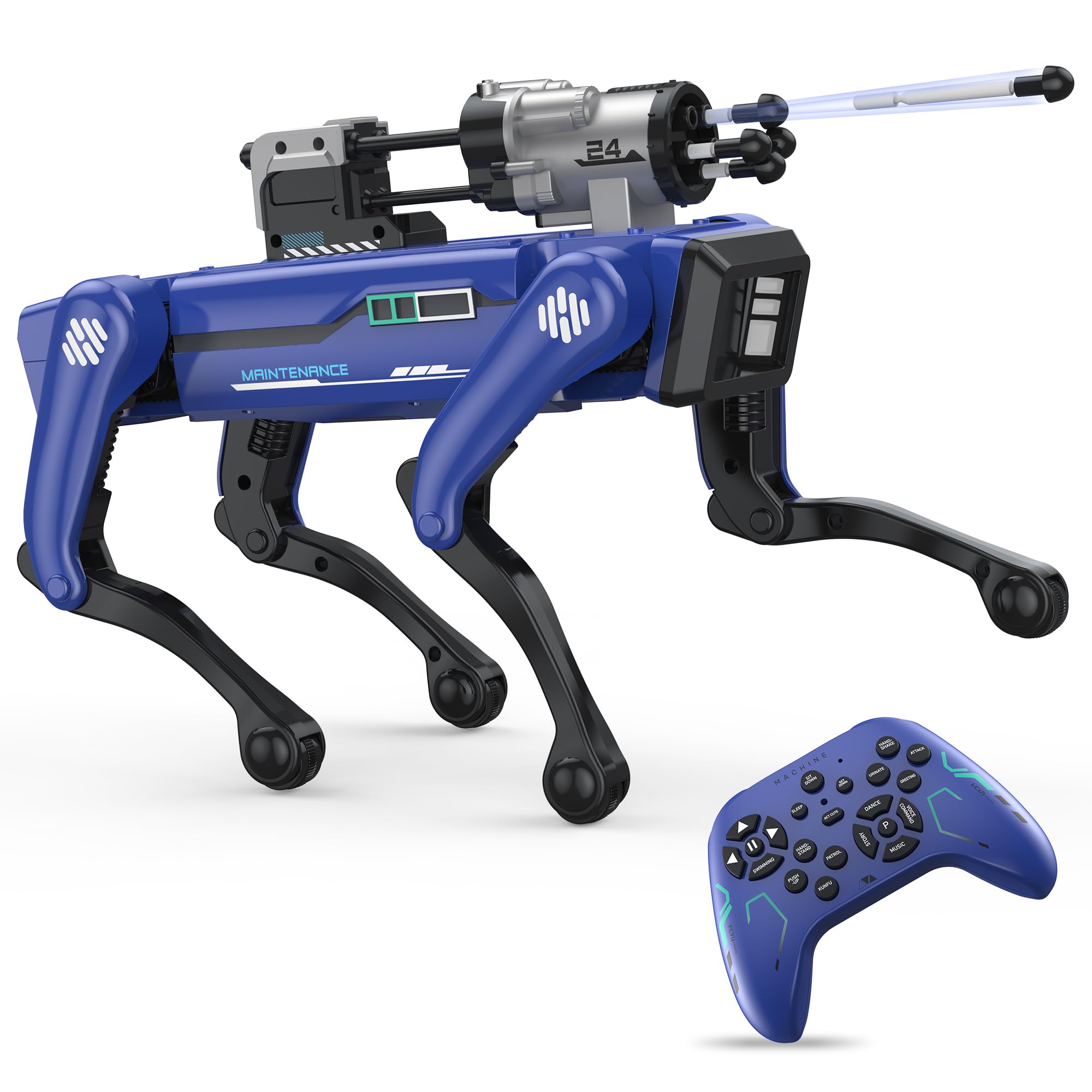
The trick list runs longer than you expect for something this simple — handshakes, handstands, a swimming motion, and a soft-blast target launcher that turns a hallway into a shooting gallery. Programming works from a button rather than a screen: press P, drive it through a sequence, press P again, and it repeats the routine.

It is a big toy at 14.1 inches nose to tail, and it moves with the busy, slightly frantic energy of a remote-control animal rather than the deliberate walk of a proper robot. Sound is the thing that wears: it runs loud and there is no volume control on the remote, so a household that minds repetitive noise should know that going in.

Bottom line: For a household that does not want another app, the TUEESN is the robot pet to buy: remote-only play, 30-plus tricks and a 25 m range.

#8

Dingdongwu Robot Dog

Dingdongwu Robot Dog

Coding practice

Doodle Score 8.2/10
Check Price

Worth Noting

  • Volume, language and coding need the app
  • Pricier than the other robot pet here
Actions
30+
Battery
600 mAh
Control
App, voice, remote
Recommended Age
6 years and up
Read the full review

The Dingdongwu's app does the unglamorous parent jobs: pin the volume, switch the robot between Chinese and English, and lock the controls so a small child cannot reset it mid-game. That sounds like a small thing until you have heard the same kung-fu sound effect forty times in an afternoon, and it is the reason this dog is easier to live with than its trick count suggests.

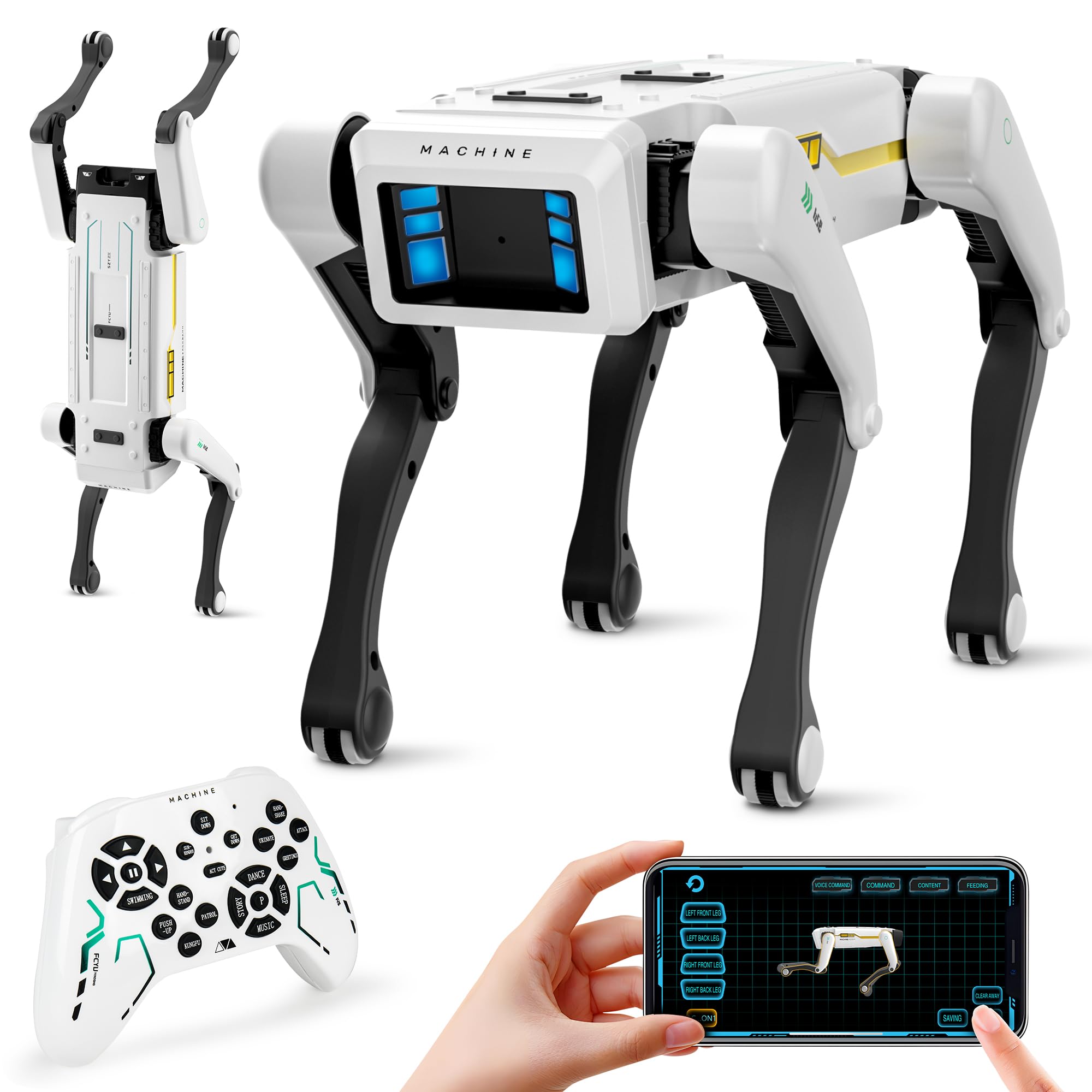
Underneath is a 30-plus-trick robot dog with English voice commands, handshakes, somersaults and a pee attack that will be the funniest thing in the house for a fortnight. Coding mode strings those actions into a sequence, which is where the toy earns its STEM label rather than just borrowing it.

Size works in its favour: at 12.2 inches long and 1.4 kg it is small enough for a bedroom floor and solid enough that it does not read as a stocking filler, with a 600 mAh battery on USB-C and an auto-shutdown that cuts the motors when it runs into furniture. The app is also where new actions arrive, so the routine list is not frozen at what shipped in the box.

We see it as the better robot pet for a child who likes fiddling with sequences rather than one who simply wants to chase something round the kitchen, and the parent controls make it the easier one to have in a shared living room. It costs more than the TUEESN here, so the extra money should be buying you the coding mode and the app controls. If neither appeals, the cheaper dog is the better buy.

Bottom line: The robot pet for a child who likes building sequences rather than chasing: app programming, voice commands and parent-controlled volume and language.

How We Chose and Tested These AI Toys

Our shortlist started with roughly 40 toys advertised as AI-powered, which we cut down by reading spec sheets and return complaints: the age range on the box, whether the toy needed a phone or a Wi-Fi connection to do anything at all, whether the maker promised software updates, and what it cost relative to what it actually did. We landed on 12 and spent four months with them in the same houses where the kids live — after school, on rainy Saturdays, on the school run, at playdates where two kids fought over one remote, and at bedtime, when a toy that mishears you is unbearable.

Battery life got timed rather than eyeballed: we charged each toy fully, ran it until it died, and noted whether it quit mid-play and whether it topped up over USB-C or ate six AA batteries from the junk drawer. We handed the remote controls to four-year-olds and watched whether the robot turned the way they expected, because a laggy controller kills the fun faster than a limited one.

Reliability was tested the way kids test it — dropped off the play table onto hardwood, shouted at from across a room with the TV on, handed to a five-year-old who mumbles. Drawing toys went on the kitchen table, and we compared the lines they produced to what the kids had asked for. Throughout, we kept a rough count of how often each toy came back out unprompted in week eight versus week one, which is how we judged value and whether any of it was worth wrapping. Giftability we measured in minutes: how long from box open to first real play, with no adult hunting for a charging cable.

How to Choose

Decide which kind of smart you are buying

Voice-command robots are the cheapest route into 'it listens to me' and the most fragile, because recognition falls apart in a noisy room and the toy is useless the moment commands stop landing. Robot pets trade vocabulary for character: a dog that walks, wags and repeats a recorded sequence is far more forgiving than one that has to understand a sentence. AI drawing devices sit at the other end — nothing is listening, so nothing can mishear, and a child ends up with a picture. Pick the interaction first, then the toy.

The phone question

Several picks here are only fully themselves with a parent's phone nearby: programming, quizzes, AI generation and even volume control all live in apps. That is fine as long as the core play works without one. The Ruko 6088 drives from its remote, the Caydo T3 draws from built-in content, and the TUEESN has no app at all. The trap is a toy whose only interesting mode needs a phone, because it quietly becomes screen time with extra steps. Before you buy, ask what your child can do with the phone in another room.

Power decides where the toy lives

Three power designs make three different toys. Rechargeable robots run roughly one and a half to two hours per charge and follow a child around the house. Disposable batteries suit small, cheap robots but turn play into an errand. Corded devices, which is both AI drawing projectors here, are brighter and never run flat, and they are furniture: plan a table near an outlet. None of these is portable the way a tablet is, so decide where the toy will actually be used before you decide which one to buy.

Age fit is about independence

The number on the box is a starting point, not a guarantee — the same robot can be a hit at four and a dud at seven. What predicts a good fit is whether a child can run the thing alone: a remote sized for small hands, gestures that need no reading, cards a preschooler can follow, or an app a grown-up has to drive. We put independence above the printed age. The Ruko 6088 and the RIVGOT are the two here a four-year-old can operate unaided; the AI projectors and the app-programmed dog assume an older child or an adult nearby.

What it costs after the first week

The purchase price is rarely the last one. Disposable batteries, replacement markers and expansion card packs all arrive later, and the RIVGOT is a good example of a toy where the included library is the product — 150 cards go a long way with a five-year-old and not very far with an eight-year-old. The AI projectors lean on app content that changes with updates, which is either a bonus or an unknown, depending on the app. Check whether an account or subscription is needed before you buy, and budget for consumables the way you would for a printer.

Frequently Asked Questions

Final Verdict

We recommend the Ruko 6088 for most families. It is the cheapest of the app-controlled robots, a four-year-old can run it unaided, and the 200-step program bar keeps it worth coming back to after the demo tricks wear thin. If your child draws rather than drives, the Caydo T3 is the better spend: a native 720p projector that turns a typed idea into something to trace.

And if the toy has to impress a nine-year-old, go bigger. The Ruko 1088's height, joints and voice control are what that age actually notices — just clear a hard floor for it first.